0 items in favorites Start inquiry
  • Add
  • How do I recommend other suppliers in the Berlin Convention Finder?

    Do you regularly work with suppliers from Berlin’s MICE industry and would like to recommend them in your listing in the Berlin Convention Finder? Of course! In these instructions, we show you step by step how it works.


    Step 1: Edit listing

    Navigate to your dashboard, where your listings are shown. To do this, click on your username in the top right-hand corner and then on “My area”.

    You will now see your listings. Click “Edit” to the right of the relevant listing.

    You will then be guided through four tabs, where you can edit your details.

    We recommend clicking “Save changes” at the bottom of the page after each change. This saves your updates temporarily. Nothing will be lost, and you can continue at any time later on.
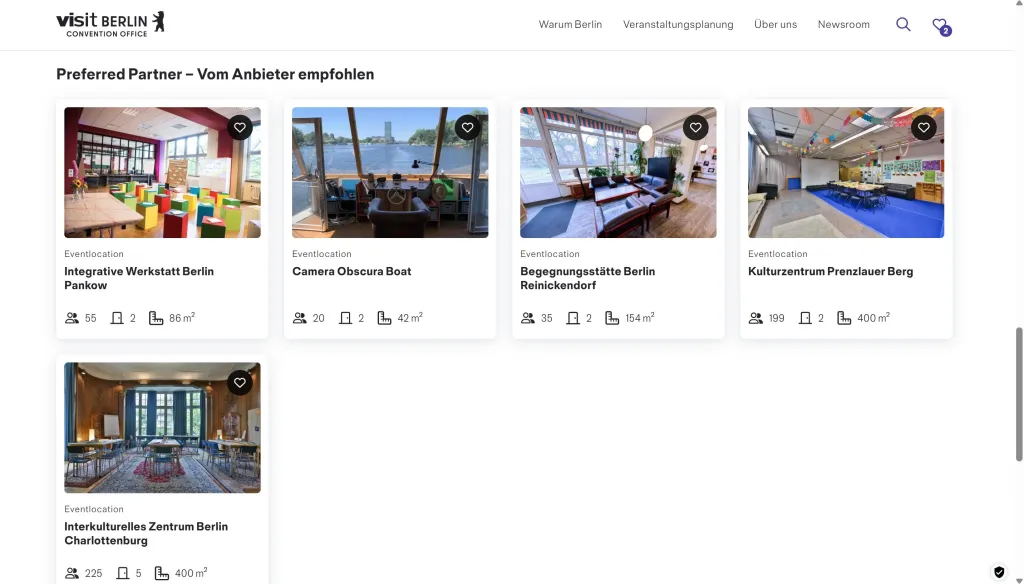
    Web page showing five venue listings with event space photos and brief details.

    Step 2: General information

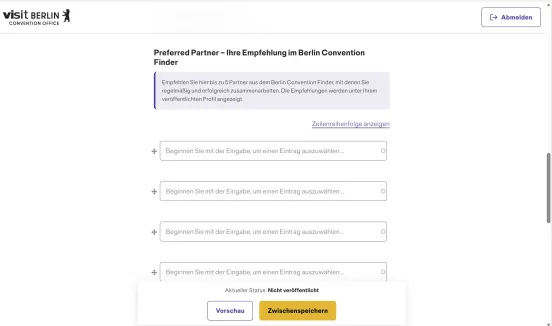
    Website form in German with input fields and cookie consent banner at the bottom.

    Under “General information”, you will find the module “Preferred Partner – Your recommendation in the Berlin Convention Finder”. Here, you can recommend up to five partners that you regularly work with or would particularly like to recommend to your clients.

    The selected partners will be displayed directly in your published listing in the Berlin Convention Finder.

    For example, you can refer to catering suppliers, technical service providers or other companies that you frequently work with.

    It is important that the relevant partner is already represented with a published listing in the Berlin Convention Finder. Only then can they be selected and linked as a Preferred Partner.

    Simply enter the name of the partner you would like to recommend in the field. The autocomplete function will help you quickly find matching listings.

    Tip: Search for the partner in advance using the keyword search in the Berlin Convention Finder. This allows you to check whether a published listing already exists.

    Step 3: Review details

    • Save progress
      By clicking the yellow “Save progress” button, your content will be saved as a draft, allowing you to continue editing your entry at a later date.
      Please note that drafts are not visible online in the Berlin Convention Finder. As a result, the full potential of your entry remains untapped, as it cannot be found by event planners.
      We recommend completing your entry promptly and submitting it for approval to achieve maximum visibility.
       
    • Request approval
      Are you happy with your changes? Excellent! Submit your content for publication by clicking the green “Send for review” button. Your entry will be reviewed by our editorial team and published once it has successfully passed the review process. You will receive an email notification as soon as your entry is live. Afterwards, feel free to view your entry in the Berlin Convention Finder and check whether you are satisfied with how it is presented. If not, simply edit it again and resubmit it for approval.

    If your changes are rejected, this is usually due to non-compliance with our quality criteria or incomplete information.
    In this case, please review your content carefully. If you have any questions or require clarification, feel free to contact us at berlinconventionfinder@visitBerlin.de.

    You can find detailed instructions on the approval and publication process on the “Approval & Publication” page.